BIM Quantity Takeoff from Revit and IFC Models

You've just received a Revit model or an IFC file, and your price is due in ten days. In theory, the model holds every quantity you need. In practice, producing a reliable BIM quantity takeoff is still a headache: incomplete schedules, badly modelled objects, Excel exports to rework line by line.

This guide explains how to extract quantities from a Revit or IFC model, which method to use depending on your role, and how to avoid the mistakes that skew a budget. It is written for estimators and quantity surveyors, BIM managers, engineering firms and general contractors.

No time to read it all? 

Kabandy turns your Revit or IFC model into a visual quantity takeoff in a few clicks.

What is a BIM quantity takeoff?

A BIM quantity takeoff (or model-based quantity takeoff, QTO) means calculating a project’s quantities — areas, volumes, lengths, number of items — directly from the digital model, instead of measuring them by hand on 2D drawings.

It is the foundation of what is called 5D BIM: the 3D model enriched with quantities and costs. The takeoff then feeds the bill of quantities, the estimate, the tender price and the cost control of the project.


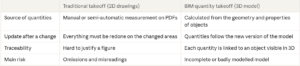
2D vs 3d models


A BIM quantity takeoff does not remove the estimator’s work: it shifts it.

You measure less, but you check the quality of the model more.


3 ways to extract quantities from a model


1. Revit schedules

In Revit, a schedule (or material takeoff schedule) lists the objects of a category with their parameters: length, area, volume, type. You then export it as a text file to rework it in Excel.

  • Pros: free if you already have Revit, quick for a simple category (doors, windows).
  • Cons: one schedule per category, parameters that vary from one family to another, no visual check, and an export to redo with every new version. You also need to know Revit, which most estimators don’t.


2. IFC export to Excel

IFC is the open BIM standard (openBIM). An IFC file can contain “base quantities” (the Qto_ property sets, for example Qto_WallBaseQuantities for walls), provided the option was enabled at export. An IFC viewer can then read them and export them to a spreadsheet.

  • Pros: independent of the authoring software (Revit, ArchiCAD, Tekla, Allplan…), ideal when you receive a model from a third party.
  • Cons: quantities are not always exported, properties change from one author to another, and the resulting spreadsheet is raw: you still have to group, clean and match each line to your bill of quantities.


3. Dedicated BIM quantity takeoff software

BIM quantity takeoff software reads the model directly (Revit or IFC), shows the objects in 3D and links each quantity to an item in the bill of quantities. When the model changes, the takeoff updates.

  • Pros: visual check of every quantity, takeoff rules reusable from one project to the next, usable without being a Revit expert.
  • Cons: a subscription and some time to get started.


This is the approach of Kabandy : the platform opens Revit files without conversion as well as IFC models, creates a dynamic link between the model and the bill of quantities, and lets you query the model in natural language thanks to AI.

Revit IFC models

Want to compare on a real project?

Upload one of your models to Kabandy and see the difference with your current schedules.

5 mistakes that skew a BIM quantity takeoff


  1. Counting the same element twice. A wall modelled twice, or a slab entered in both the architectural and the structural model, inflates quantities without anyone noticing in a spreadsheet.
  2. Using the wrong object. A beam drawn as a wall, a railing modelled as a “generic model”: the element exists, but it falls into the wrong category or disappears from the takeoff.
  3. Ignoring measurement rules. The model gives raw geometry. Your bill of quantities follows rules: deducting openings above a certain area, measuring to centre line or to face, wall-slab junctions. Without these rules, the figures don’t match what you invoice.
  4. Trusting empty or wrong parameters. A missing material, an unspecified concrete grade or a wrongly assigned level make groupings unusable.
  5. Not tracking versions. The architect sends revision C, but the takeoff is still based on revision B. Without comparing versions, differences go unnoticed until the site.

What these mistakes have in common: they are invisible in a table of figures, but obvious as soon as you see the objects in 3D. Hence the value of a visual quantity takeoff, where every quantity can be clicked and checked in the model.

Preparing your model for a reliable takeoff

A good BIM quantity takeoff starts before extracting quantities. Three levers make the difference.


A shared classification

Each object must be linked to an item in your bill of quantities. To do this, you give it a classification code: NL-SfB, Uniformat, Omniclass, Uniclass, or the structure of your specification. Without that code, objects have to be sorted by hand. Some tools, including Kabandy, can automatically enrich the model with your own codes.


Requirements written with IDS

IDS (Information Delivery Specification) is a buildingSMART standard that describes, in a file software can read, the information expected in a model: “every wall must have a material”, “every slab must state its concrete class”. You can then automatically check whether the model you receive meets these requirements, before starting the takeoff.


A quality check before every takeoff

Before extracting quantities, check at least:

  • duplicates and overlapping objects;
  • objects without a category or modelled as “generic”;
  • empty parameters (material, level, type);
  • the model revision and the date it was received.


Issues found can be sent back to the model author as BCF, the standard format for exchanging comments on a BIM model.


What if the model is imperfect? That is the most common case. Rather than waiting for a perfect model, a visual takeoff tool lets you correct or complete quantities where the model is incomplete, while keeping every figure traceable.

Step by step: from model to takeoff

Here is the method we recommend to go from a Revit or IFC model to a usable takeoff.


  1. Get the right version. Note the revision, the date and the authoring software. For an IFC file, check the version (IFC 2×3, IFC 4 or IFC 4.3).
  2. Check the model. Run the checklist above, ideally with an IDS file. Send blocking issues to the author as BCF.
  3. Classify the objects. Link each family of objects to an item in the bill of quantities using your classification.
  4. Define the takeoff rules. Unit (m², m³, m, nr), deductions, measurement method. Save them to reuse on the next project.
  5. Extract and check visually. For each item, display the counted objects in 3D. What isn’t coloured isn’t counted.
  6. Complete what’s missing. Add the items the model doesn’t contain (site setup, minor works) or measure them manually.
  7. Export to the bill of quantities. Transfer quantities to your estimating tool or a spreadsheet.
  8. Update with every revision. Compare versions to see immediately what has changed and the impact on the budget.


With schedules or an Excel export, steps 5 and 8 are the most time-consuming. That is where a dedicated tool saves the most time.

Automate the longest steps.

Visual checks, reusable takeoff rules, version comparison: Kabandy takes care of it.

BIM quantity takeoff by country: linking the model to the right standard

A BIM quantity takeoff is only valuable if it speaks the language of the target market. Each country has its own pricing documents and measurement rules, and the model must be able to connect to them.

  • In Wallonia, the Cahier des charges-type Bâtiments (CCTB) published by the Public Service of Wallonia is the reference for public building contracts. Version 01.10 was released on 31 October 2022 and focuses on the digitalisation of construction (UVCW).
  • In Flanders, the Bouwtechnisch Bestek Woningbouw of the VMSW (Flemish Social Housing Company) has been the mandatory basis for social housing tender documents since 1 September 2015. Its article structure is widely used beyond social housing.
  • Across the country, the NL-SfB classification, inherited from the Netherlands, is still very common in models.


France, United Kingdom, Germany: other standards


BIM rules and classifications


The good practice is the same everywhere: give each object in the model the code of the target standard (CCTB or VMSW article, DPGF item, NRM2 code, DIN 276 cost group). The takeoff then falls automatically into the right document, with no re-keying. Kabandy enriches the model with these classification codes, whatever the country.


Tendering in Belgium, France or the UK?

Kabandy links your model to your standard (CCTB, VMSW, DPGF, NRM2…) and to the structure of your specification.

Questions and answers on BIM quantity takeoff


How do you do a quantity takeoff from a Revit model?

Two options: create schedules in Revit and export them to Excel, or open the file in BIM quantity takeoff software. The second lets you check every quantity in 3D and follow new versions of the model.


Can you extract quantities from an IFC file?

Yes. An IFC file contains the geometry of each object and, if the option was ticked at export, base quantities (Qto_). An IFC viewer or a BIM takeoff tool can read and group them.


BIM quantity takeoff or 5D BIM: what’s the difference?

A BIM quantity takeoff calculates quantities from the model. 5D BIM adds prices to track the cost of the project.


How do you link a BIM quantity takeoff to the CCTB in Wallonia?

By giving each object in the model the number of the matching CCTB article. Quantities then fall into the order of the specification, with no re-keying.


Can a BIM takeoff be used to fill in the summary bill of quantities of a Belgian public tender?

Yes, provided the model items match those of the summary bill of quantities and the measurement rules of the specification are applied. Items missing from the model still need to be added by hand.


How do you go from a BIM model to a DPGF?

By linking each object in the model to the matching DPGF item, trade package by trade package. Quantities then flow straight into the price breakdown; items that aren’t modelled still need to be completed.


Do you need to be a Revit expert to do a BIM quantity takeoff?

Not with a dedicated tool. Kabandy is designed for estimators and site teams, with no training in modelling software.

Move to a reliable BIM quantity takeoff


A BIM quantity takeoff saves time as long as you don’t treat it as a simple spreadsheet export. Check the model, classify the objects, apply your measurement rules and verify every quantity in 3D. That is what turns a model into a budget you can defend.